Sunday, August 25, 2019

Huawei P 306.1" FHD+ (2340*1080p) display, OLED Screen,  CPU: Hisilicon Kirin 980 Octa Core 2*Cortex-A76 Based 2.6GHz+ 2*Cortex-A76 Based 1.92GHz+ 4*Cortex-A55 1.8GHz, GPU: Mali G76  EMUI9.1.0 Android 9.0 OS, 8GB RAM + 256GB ROM  Front camera: 32.0MP, Three rear cameras: 40.0MP+16.0MP+8.0MP  Dual Nano sim dual standby  Support 4G/WIFI/Bluetooth/multi-language/OTG/Touch ID/Type-C/NFC/In-screen fingerprint sensor


Item: Huawei P30
Price listed: RM 2000

General
  • Available Status: Available. Released 2019, March
  • Network Bands: 2G & 3G & 4G
  • SIM: Single SIM (Nano-SIM) or Hybrid Dual SIM (Nano-SIM, dual stand-by)
  • Dimension: 149.1  x  71.4  x  7.6 mm
  • Weight: 165 g (5.82 oz)
  • Body Type:
    Front/back glass, aluminum frame
    IP53 dust and splash protection
  • OS: Android 9.0 (Pie); EMUI 9.1
  • CPU: Octa-core (2x2.6 GHz Cortex-A76 & 2x1.92 GHz Cortex-A76 & 4x1.8 GHz Cortex-A55)
  • Chipset: HiSilicon Kirin 980 (7 nm)
  • GPU: Mali-G76 MP10
  • Internal: 8GB RAM, 128GB ROM
  • External Memory: NM (Nano Memory), up to 256GB (uses shared SIM slot)
  • Battery: Non-removable Li-Po 3650 mAh battery
    Fast battery charging 22.5W
  • Colors: Aurora, Amber Sunrise, Breathing Crystal, Black, Pearl White
Connectivity
  • 3G/4G Speed: HSPA 42.2/5.76 Mbps, LTE-A Cat21 1400/200 Mbps
  • Wi-Fi: Wi-Fi 802.11 a/b/g/n/ac, dual-band, Wi-Fi Direct, hotspot
  • Bluetooth: 5.0, A2DP, aptX HD, LE
  • NFC: Yes
  • USB: 3.1, Type-C 1.0 reversible connector
Entertainment & Features
  • Sensor: Fingerprint (under display), accelerometer, gyro, proximity, compass, color spectrum
  • GPS: Yes, with dual-band A-GPS, GLONASS, BDS, GALILEO, QZSS
  • Radio: No
Camera & Video
  • Primary: Triple: 40 MP, f/1.8, 27mm (wide), 1/1.7", PDAF/Laser AF + 8 MP, f/2.4, 80mm (telephoto), 1/4", PDAF/Laser AF, OIS, 3x optical zoom + 16 MP, f/2.2, 17mm (ultrawide), PDAF/Laser AF
  • Secondary: 32 MP, f/2.0, (wide), 0.8µm
  • Video: 2160p@30fps, 1080p@60fps, 1080p@30fps(gyro-EIS), 720p@960fps
    1080p@30fps
  • Feature: Leica optics, dual-LED dual-tone flash, panorama, HDR
    HDR
Screen
  • OLED capacitive touchscreen, 16M colors
  • 6.1 inches, 91.3 cm2 (~85.8% screen-to-body ratio)
    1080 x 2340 pixels, 19.5:9 ratio (~422 ppi density)
  • DCI-P3
    HDR10
Sound & Music
  • Loud Speaker: Voice 83dB / Noise 75dB / Ring 83dB
  • 3.5mm jack: Yes
    32-bit/384kHz audio Active noise cancellation with dedicated mic Dolby Atmos sound
  • Radio: No

iPhone XS

iPhone XS Gold Unboxing & ReviewHome - kitchen - bedroom - bathroom - house - luxury - interior design - cooking - recipe - flatlay - wallpaper - photography - homescreen - pink |  Pinterest @kaoriihayashii

Item: iPhone XS
Price listed: RM 4600

General

  • Available Status: Available. Release 2018, September 21st
  • Network Bands: 2G & 3G & 4G
  • SIM: Nano-SIM and e-SIM
  • Dimension: 143.6  x  70.9  x  7.7 mm
  • Weight: 177 g (6.24 oz)
  • Body Type:
    Front/back glass, stainless steel frame
    - IP68 dust/water resistant (up to 2m for 30 mins) - Apple Pay (Visa, MasterCard, AMEX certified)
  • OS: iOS 12
  • CPU: Hexa-core
  • Chipset: Apple A12 Bionic
  • GPU: Apple GPU (4-core graphics)
  • Internal: 64/256/512 GB, 4 GB RAM
  • External Memory: No
  • Battery: Non-removable Li-Ion battery
  • Talk Time: Up to 20 h (3G)
  • Colors: Space Gray, Silver, Gold
Connectivity
  • 3G/4G Speed: HSPA 42.2/5.76 Mbps, LTE-A (4CA) Cat16 1024/150 Mbps, EV-DO Rev.A 3.1 Mbps
  • Wi-Fi: Wi-Fi 802.11 a/b/g/n/ac, dual-band, hotspot
  • Bluetooth: 5.0, A2DP, LE
  • NFC: Yes
  • USB: 2.0, proprietary reversible connector
Entertainment & Features
  • Sensor: Face ID, accelerometer, gyro, proximity, compass, barometer
  • GPS: Yes, with A-GPS, GLONASS, GALILEO, QZSS
  • Radio: No
  • - Fast battery charging: 50% in 30 min
    - Qi wireless charging
    - Siri natural language commands and dictation
    - iCloud cloud service
    - MP3/WAV/AAX+/AIFF/Apple Lossless player
    - MP4/H.265 player
    - Audio/video/photo editor
    - Document editor
Camera & Video
  • Primary: Dual: 12 MP, f/1.8, 28mm, 1/2.55", 1.4µm, OIS, PDAF + 12 MP, f/2.4, 52mm, 1.0µm, OIS, PDAF, 2x optical zoom
  • Secondary: 7 MP, f/2.2, 32mm
  • Video: 2160p@24/30/60fps, 1080p@30/60/120/240fps, HDR, stereo sound rec.
    1080p@60fps
  • Feature: Quad-LED dual-tone flash, HDR (photo/panorama)
    HDR
Screen
  • Super AMOLED capacitive touchscreen, 16M colors
  • 5.8 inches, 84.4 cm2 (~82.9% screen-to-body ratio)
    1125 x 2436 pixels, 19.5:9 ratio (~458 ppi density)
  • Multi Touch: Yes
  • Scratch-resistant glass, oleophobic coating
    - Dolby Vision/HDR10 compliant
    - Wide color gamut display
    - 3D Touch display
    - True-tone display
    - 120 Hz touch-sensing
Sound & Music
  • Alert Types: Vibration, proprietary ringtones
  • Loud Speaker: Yes, with stereo speakers
  • 3.5mm jack: No
    - Active noise cancellation with dedicated mic
  • Radio: No

Samsung Galaxy S10+


GVIEWIN's Samsung S10/10e silicone marble cases boasts slim and sleek style for your Samsung S10/10e and awesome protection, fits both your style and protection needs.The shock-absorbing flexible bumper maximizing defensive features, greatly protects the back and sides of your Samsung Galaxy S10/10e from accidental falls or drops.    #samsungs10 #samsungs10case #casesforgirls #phonecases #samsungs10e #gviewin #floralpattern #designcases #siliconecase #cutephonecases #iphonecases #iphonexGVIEWIN's Samsung Galaxy S10 cases boasts slim and sleek style for your Samsung Galaxy S10 and awesome protection, fits both your style and protection needs.The shock-absorbing flexible bumper maximizing defensive features, greatly protects the back and sides of your Samsung Galaxy S10 from accidental falls. #samsungS10cases #S10cases #samsungS10ecases #iPhonexcase #iPhonexscase #gviewin #casesforgirl #samsungcase #samsungs9case #iPhoneaccessories  #Phonecover  #CustomizedCases #sunflowers

SAMSUNG GALAXY S10+

LIKE NEW! Samsung S10 Plus! 64GB! Prism BLACK! Clean IMEI! No flaws or scratches! Unlocked for ANY carrier and ready for immediate use! CDMA/GSN UNLOCKED! Just pop your SIM card in and you’re good to go! Comes with original packaging with headphones, charger and adapter!


Item: Samsung Galaxy S10+
Price listed: RM 2570


  • Available Status: Available. Released 2019, March
    • Network Bands: 2G & 3G & 4G
    • SIM: Single SIM (Nano-SIM) or Hybrid Dual SIM (Nano-SIM, dual stand-by)
    • Dimension: 149.9  x  70.4  x  7.8 mm
    • Weight: 157 g (5.54 oz)
    • Body Type:
      Back glass (Gorilla Glass 5), aluminum frame
      Samsung Pay (Visa, MasterCard certified) IP68 dust/water proof (up to 1.5m for 30 mins)
    • OS: Android 9.0 (Pie); One UI
    • CPU: Octa-core (2x2.7 GHz Mongoose M4 & 2x2.3 GHz Cortex-A75 & 4x1.9 GHz Cortex-A55)
    • Chipset: Exynos 9820 Octa (8 nm)
    • GPU: Mali-G76 MP12
    • Internal: 8GB RAM, 128GB ROM
    • External Memory: microSD, up to 1 TB (uses shared SIM slot) - dual SIM model only
    • Battery: Non-removable Li-Ion 3400 mAh battery
      Fast battery charging 15W
      Fast wireless charging 15W
      Power bank/Reverse wireless charging 9W
    • Colors: Prism White, Prism Black, Prism Green, Prism Blue, Canary Yellow, Flamingo Pink, Cardinal Red, Smoke
    Camera & Video
    • Primary: Triple: 12 MP, f/1.5-2.4, 26mm (wide), 1/2.55", 1.4µm, Dual Pixel PDAF, OIS + 12 MP, f/2.4, 52mm (telephoto), 1/3.6", 1.0µm, AF, OIS, 2x optical zoom + 16 MP, f/2.2, 12mm (ultrawide), 1.0µm
    • Secondary: 10 MP, f/1.9, 26mm (wide), 1.22µm, Dual Pixel PDAF
    • Video: 2160p@60fps, 1080p@240fps, 720p@960fps, HDR, dual-video rec.
      2160p@30fps, 1080p@30fps
    • Feature: LED flash, auto-HDR, panorama
      Dual video call, Auto-HDR
    Entertainment & Features
    • Sensor: Fingerprint (under display), accelerometer, gyro, proximity, compass, barometer, heart rate, SpO2
    • GPS: Yes, with A-GPS, GLONASS, BDS, GALILEO
    • Radio: FM radio (USA & Canada only)
    Connectivity
    • 3G/4G Speed: HSPA 42.2/5.76 Mbps, LTE-A (7CA) Cat20 2000/150 Mbps
    • Wi-Fi: Wi-Fi 802.11 a/b/g/n/ac/ax, dual-band, Wi-Fi Direct, hotspot
    • Bluetooth: 5.0, A2DP, LE, aptX
    • NFC: Yes
    • USB: 3.1, Type-C 1.0 reversible connector
    Screen
    • Dynamic AMOLED capacitive touchscreen, 16M colors
    • 6.1 inches, 93.2 cm2 (~88.3% screen-to-body ratio)
      1440 x 3040 pixels, 19:9 ratio (~550 ppi density)
    • Corning Gorilla Glass 6
      HDR10+
      Always-on display
    Sound & Music
    • Loud Speaker: Voice 82dB / Noise 74dB / Ring 85dB
    • 3.5mm jack: Yes
      32-bit/384kHz audio Active noise cancellation with dedicated mic Dolby Atmos/AKG sound
    • Radio: FM radio (USA & Canada only)


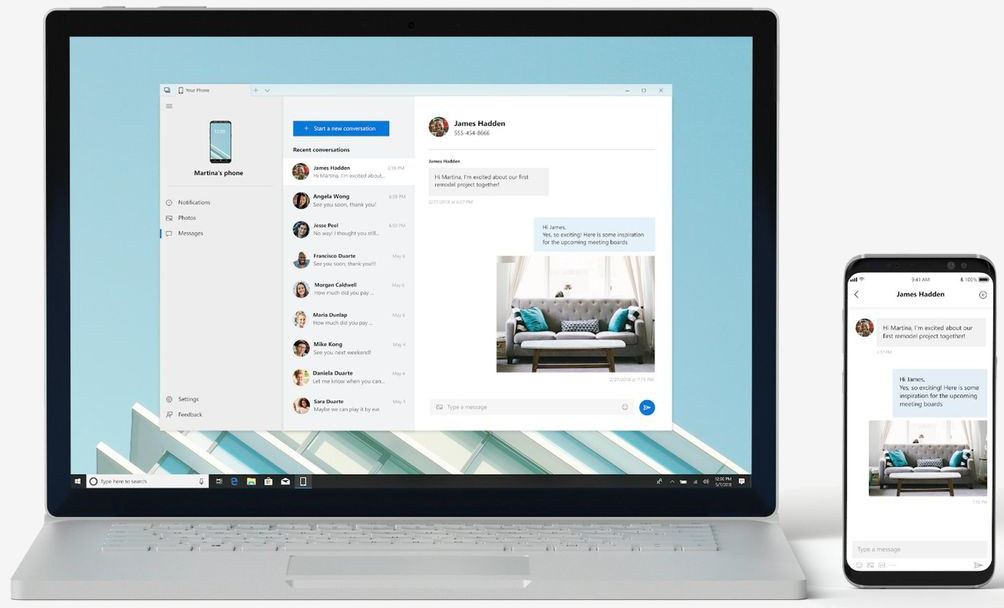
    Microsoft brings Android integration to Windows with "Your Phone" mirroring service


    In brief: Microsoft has made its upcoming phone mirroring service available to Windows Insider users. In order to use the service, you'll need a Samsung Galaxy device and a PC with the latest Bluetooth radio. While phone mirroring is currently limited to Android devices, Microsoft says it will eventually make its way to iPhone users.
    A new feature is now available in beta for Windows Insiders: the ability to mirror your Android phone directly to your PC.
    Microsoft is testing updates to the Windows 10 app Your Phone, which will allow users to interact with their phone on their desktop. Microsoft showed off the phone screen tech during their Surface event in October, and early beta versions of the app, albeit very limited, have been available since last summer.
    The phone mirroring service uses Bluetooth with Low Energy Peripheral (LEP) mode to connect your phone and your PC. Microsoft is making the new Bluetooth mode a requirement for new PCs, so users with older hardware may not be able to use the feature yet. Older Surface devices also cannot take advantage of the service, as the Surface Go is the first Surface device to have Bluetooth LEP built in.
    Microsoft is also restricting the support to Samsung devices for now but iPhone support is expected to come at a later date.. If you have a Samsung Galaxy S8 or S9, you can test the service now. Users with other devices will have to wait until Microsoft expands the compatibility list, which they say will be happening soon.
    The goal of the service is to increase productivity by allowing users to check their phone less often.
    iphone camera features revealed


    HOW TO GET THE MOST OUT OF YOUR IPHONE CAMERA FEATURES


    1. SWIPE TO OPEN

    This one some of you may know already.  This can be crucial when taking action shots or capturing unexpected moments.  The time it takes to open the regular way by entering your passcode you may have missed the shot.  Touch the home button to “wake up” your phone. Then grab the “camera grabber” icon at the very bottom and slide it up. It will open directly to your camera (skipping the verification step).  On my iPhone 7 doing this brings me to another screen where I have an option to choose the camera icon in the bottom right corner.  If you are shooting home decor (like I am) this one isn’t a game changer.  For spontaneous captures and all sports/action photography this really is vital.

    2.  TAP FOCUS & SET EXPOSURE

    Here’s the biggie!  To manually tell your camera where to focus tap the screen.  How did I not know this??  This is very  important.  By tapping the screen and telling your camera where to focus you can control what is in focus (which will be what you care about).  Now that you have set where to focus you can also adjust the exposure manually by sliding your finger up or down on the screen.

    3.  LOCK FOCUS AND EXPOSURE

    Let’s go deeper into your iphone camera features. Now you’ve spent some time setting the focus and exposure.  But as soon as you take that one photo those settings disappear and your camera goes back to no setting.  You might want to take 1 or 2 (or 30) more photos of this shot.  You do not want to have to repeat this every time.  So set your focus and exposure to lock itself.  When you tap the photo to begin the process instead of releasing it simply hold it for a couple seconds and the text will appear at the top “AE/AF LOCK”.  When you are done, simply tap the screen again to unlock.

    4.  TAKE HDR PHOTOS

    Here is one of the most powerful of your iphone camera features. HDR stands for High Dynamic Range.  Confession:  I would see this on my photos from time to time and I had zero idea what it meant…I didn’t even know how it got on there.  Yikes!  I’m so happy to be enlightened now, and to share this in case you too have been in the dark.
    HDR allows you to properly expose your photos so that both the highlights (lighter areas) and the shadows (darker areas) are properly exposed.  This is especially helpful when you are taking landscape photos, but it also is sometimes very helpful when you have a room with a lot of light in one area and dark in another area.
    Your iPhone will automatically have HDR set to Auto.  You can change this to On.  At the top of your camera screen is a bar where you have the flash option, HDR, live option, timer option, and filter option.  Hit HDR and select ON.
    You will want to set your camera to save both the HDR version and non HDR version so you can compare and choose which is best.  In your phone go to SETTINGS, then PHOTO & CAMERA, at the bottom under HDR select “Keep Normmal Photo”.  Then your phone will save 2 of the same photo. It does a 2 shot burst to capture the best lighting.

    5. BURST MODE

    5th on the list of powerful iphone camera features is the burst mode. If you are taking home decor photos as I am you will not be as excited about the burst mode as sports photographers are, but it’s still good to be aware of.  Burst is very useful for moving subjects.  Tap and hold your finger down on the shutter button and you will create a burst of photos, which is a collection of rapid-fire photos.  It is great when you are trying to get the timing right…this takes the guess work out of when to push down the shutter.
    San Diego Parasailing


    Here are my top photo editing apps recommended for travelers!


    Snapseed
    Facetune
    VSCO
    Touch Retouch
    iWatermark

    HOW TO SAVE YOUR SMARTPHONE BATTERY (WHILE TRAVELING)


    Turn off your WiFi

    When you are not using or, even worse, not connected, this drains the battery. Your phone will keep looking for a connection. This will use so much battery without you even knowing.

    Turn off your data (when not in use)

    If you are not researching anything, your data is useless. It will use your battery to make sure you always have a steady connection. Which you don’t really need at that moment, so turn it off!

    Turn off your Bluetooth

    Same as with your WiFi and data, your Bluetooth will keep looking for connections to make. Bluetooth is something you rarely need, so make sure to turn it off by default.

    Dim your screen brightness

    Turn down the brightness on your phone. This reduces the power your screen needs and saves you some battery power.

    Turn on battery saving mode

    If you are really scrapping for battery, turn on battery saving mode. Often this will limit certain activities on your smartphone to make sure you save battery.

    Leave your phone in your pocket

    As simple as that, just leave it in your pocket. Turning the screen on and off again to see if you have any notifications is using the battery. Just let it rest in your pocket, where the screen can stay off.

    Switch off the apps you don’t use

    A lot of people let their apps running in the background. This way they are already running when they need them. When they need them. If you are not using the app right now, you don’t need it. Close all your apps to save that little bit of battery on your phone.

    Avoid the use of apps with GPS (Maps, Pokemon, Waze, …)

    GPS is a smartphone battery killer. Apps like Google Maps, Waze, and Pokemon Go are all GPS dependent. If you are trying to save your battery, avoid these apps. Of course it’s not always possible. Just make sure to keep the use of them as short as possible.
    I've written an article about the 5 Must Have Apps For Your Small Business. To find out which ones I simply cannot live without, click to find out.


    PLANN (Formerly Plan Your Gram)  

    CANVA

    A COLOR STORY

    BITLY

    TRELLO

    TEN THINGS YOU DIDN’T THINK OF WHEN TAKING PHOTOS WITH YOUR PHONE


    1. GIRL, CLEAN YOUR LENS 

    2. FIND THE LIGHT

    3. BOUNCE THE LIGHT

    4. PAWS OFF THE ZOOM FEATURE

    5. HOLD STILL!

    6. MIND YOUR LINEAR LINES

    7. LOCK YOUR FOCUS

    8. CHANGE YOUR PERSPECTIVE

    9. SIMPLIFY THE CONTENTS IN THE FRAME

    10. SOURCE EDITING APPS